

03 Sep How to Add Google Reviews to WordPress Without Hurting Performance, UX or SEO
A review widget looks simple in a mock-up: a row of stars, a rating and a few customer comments. In production it is another dynamic component with a script, remote data, responsive states, accessibility requirements and possible structured data. Add it carelessly and the page may shift during load, execute the same script twice, disappear behind a cache layer or imply search benefits that Google does not promise.
The right implementation begins with a narrow question: what does this page need the reviews to do? A service page may need two detailed reviews near an enquiry form. A homepage may need a compact rating badge. A dedicated testimonials page can justify a longer feed. Starting with the user task prevents the common mistake of loading the largest layout on every template simply because it is available.
This guide covers three WordPress integration routes—native block or shortcode, a Custom HTML embed, and a theme-level implementation—and shows how to keep each one maintainable. It also explains performance testing, layout stability, accessible interaction, caching, Content Security Policy and review schema cautions.
Choose the smallest integration surface
For many sites, the safest path is the one with the least custom code. A maintained Google reviews widget for WordPress can provide a native block or shortcode while retaining a Custom HTML route for one-off or theme-level placements. The implementation decision should be based on ownership and scope, not on whether one method appears more “technical.”
Use a native block when editors need to place and preview the component themselves. Use a shortcode when the page builder or legacy editor has a reliable shortcode element. Use a Custom HTML embed when the placement is limited and the account has permission to save the required markup. Use theme code when the component belongs to a reusable template and a developer will own testing through theme updates.
The smaller surface is the route with the fewest moving parts for that team. For an editorial team, that is usually a block. For a custom theme with automated deployments, a template partial and a properly enqueued script may be easier to govern than markup pasted across several pages.
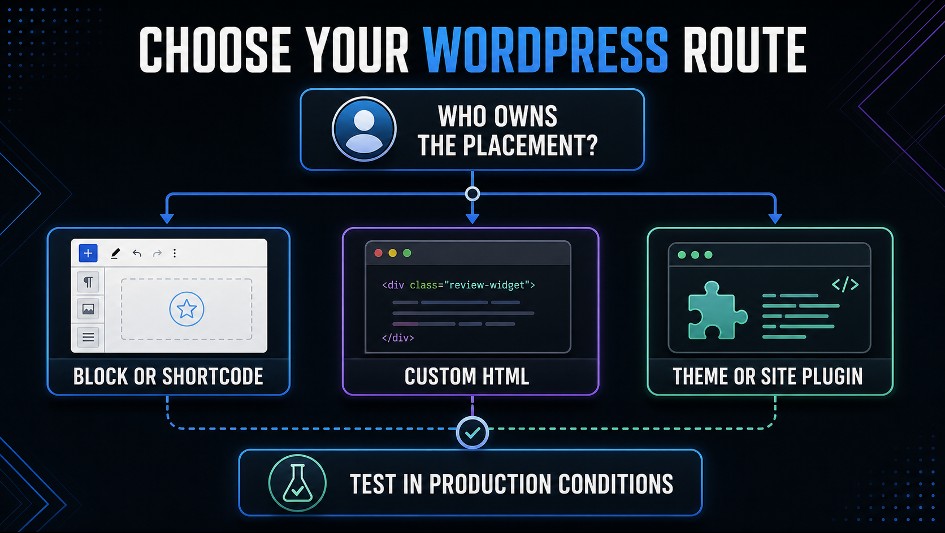
Figure 1. Choose the integration route according to who owns the placement, then test the selected route under real production conditions.
Method 1: native block or shortcode
A block is the most WordPress-native editorial experience. The editor selects a configured widget, sees it in context and can move it without touching code. A shortcode provides similar portability in environments such as the classic editor and many page builders.
A typical shortcode placement looks like this:
[grwi_widget id=”your-widget-key”]
The exact shortcode should come from the widget’s WordPress interface rather than being typed from memory. Treat the widget key as configuration. Do not change its format, reuse a key from a different client site or place secret credentials in the shortcode. A public widget identifier and a private API secret are different things; the integration should never require exposing a private key in post content.
The block or shortcode route has three operational advantages:
- editors can change placement without editing theme files;
- the plugin can load assets only when the component is present;
- updates to the integration remain in one maintained codebase.
Its trade-off is dependency ownership. The site now relies on a plugin, so the normal plugin controls apply: review its update history, compatibility, permissions, output and failure behaviour. Test updates in staging if the widget appears on conversion-critical pages.
Method 2: Custom HTML block
The Custom HTML block is useful when the provider supplies a small embed and no native block is needed. WordPress.org’s Custom HTML block documentation explains that the block accepts HTML, but permissions matter: users without the unfiltered_html capability may have disallowed tags such as <script> removed when the post is saved.
A generic hosted-widget pattern uses one asynchronous script plus a container:
<script src=”https://example-widget-provider.test/widget.js” async defer></script>
<div class=”review-widget” data-widget-key=”YOUR_WIDGET_KEY”></div>
Use the exact production snippet supplied by the service. The example above is intentionally vendor-neutral. The important architectural rule is to load the script once per page, even if several widget containers appear. Duplicating the same <script> tag in the header, a page-builder block and the footer can cause repeated initialization, extra network work or inconsistent rendering.
The Custom HTML route is appropriate when:
- there are only one or two controlled placements;
- the editor role can save the required markup;
- the theme or security layer does not strip the script;
- the provider’s script is already asynchronous;
- a developer has documented where the snippet lives.
It becomes fragile when snippets are copied into many posts. At that point, updates require a content search and editors can easily create mismatched versions. Move repeated integration into a plugin, pattern or template instead.
Method 3: theme or small site plugin
A template-level integration is appropriate for site-wide locations such as a footer badge or a reusable service-page section. Do not hard-code external script tags in header.php. WordPress provides an enqueue system so dependencies, placement and loading strategies can be managed centrally. PHP Webquest’s explanation of how PHP works in WordPress provides useful background on the server-side role behind this template layer.
The WordPress Plugin Handbook’s guide to server-side PHP and enqueuing recommends wp_enqueue_script() and notes that scripts should be added through the appropriate hook. A simplified pattern is:
add_action( ‘wp_enqueue_scripts’, ‘site_reviews_widget_assets’ );
function site_reviews_widget_assets() {
if ( ! is_page_template( ‘templates/service.php’ ) ) {
return;
}
wp_enqueue_script(
‘site-reviews-widget’,
‘https://example-widget-provider.test/widget.js’,
array(),
null,
array(
‘strategy’ => ‘async’,
‘in_footer’ => true,
)
);
}
The sample uses a placeholder origin; replace it with the exact documented URL for the selected provider. The conditional prevents a site-wide download when the widget only exists on one template. In real code, base the condition on the actual placement: a page template, block detection, shortcode detection or explicit theme option.
Then output the container in a template part:
<section class=”customer-proof” aria-labelledby=”customer-proof-title”>
<h2 id=”customer-proof-title”>What customers say</h2>
<div
class=”review-widget”
data-widget-key=”<?php echo esc_attr( $widget_key ); ?>”
></div>
</section>
Keep the widget identifier in one configuration source. For a single site, that might be a theme option. For a multisite or agency build, it may be an environment-aware settings page. Escape output even when the value is controlled by an administrator.
Avoid editing a third-party plugin to change its markup or loading behaviour. Those changes will be overwritten on update. Use documented hooks, a child theme or a small companion plugin.
Set a performance budget before choosing a layout
Third-party JavaScript has a cost even when it loads asynchronously. It can add DNS and connection time, network requests, main-thread work, images and layout changes. The correct question is not “Does it use async?” but “What does this component cost on the actual page, and is that cost proportionate to the value?”
The web.dev guide to loading third-party JavaScript efficiently recommends auditing external scripts, removing components that do not add clear value and loading non-critical resources asynchronously. Apply that discipline before and after installation.
Record a baseline on the same URL, device profile and test conditions. Then add the widget and compare:
- transferred JavaScript and image bytes;
- number of third-party requests and origins;
- main-thread execution time;
- Largest Contentful Paint when the widget is above the fold;
- Cumulative Layout Shift while the widget initializes;
- Interaction to Next Paint when a carousel is used;
- visual completion and failure behaviour on a throttled connection.
Run several tests rather than trusting one score. Remote data, cache state and test infrastructure vary. Look at the waterfall and trace, not only the headline performance grade.
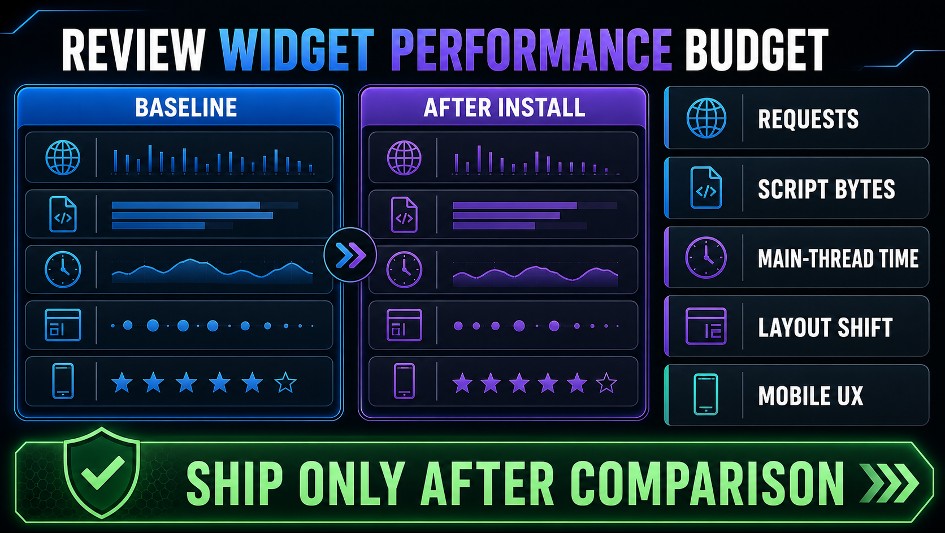
Figure 2. Measure the same page before and after installation; ship only when the widget’s technical cost is proportionate to its value.
Load only where the proof is useful
The easiest byte to optimise is the one not downloaded. If a rating badge appears only on service pages, do not enqueue the widget on the blog, privacy policy and account area. If a full review feed appears below the fold on a long page, consider whether the provider supports delayed initialization near the viewport.
Do not install two review products with overlapping functions. A floating badge from one provider and a carousel from another may fetch separate frameworks and duplicate the same evidence. Consolidate the job before trying to micro-optimise each script.
Load the script once
Multiple containers do not usually require multiple script tags. Centralise the loader and let each container carry its own widget identifier. Check page source after caching and minification to confirm that optimization plugins have not duplicated, reordered or removed the loader.
Reserve space to prevent layout shift
An empty container has no height. When remote reviews arrive, content below it may jump. Reserve a sensible minimum height for the chosen breakpoint and update it when the layout changes:
.customer-proof .review-widget {
min-height: 220px;
}
@media (max-width: 640px) {
.customer-proof .review-widget {
min-height: 320px;
}
}
These values are examples, not universal settings. Measure the rendered component. A compact badge may need much less; a single mobile review card may need more. Avoid fixed heights that clip longer reviews. min-height creates initial stability while still allowing content to grow.
Protect the critical path
Do not make a below-the-fold review carousel the Largest Contentful Paint candidate by placing a large empty hero around it. The primary page promise, product image or service heading should render independently of the external script. If the widget fails, users should still understand the offer and complete the main task.
A graceful fallback might be a normal link to the business’s review profile or a server-rendered rating summary, provided the data and attribution remain accurate. Do not conceal the entire call-to-action until the widget responds.
Design the component for real content
Review text is variable. One customer writes a sentence; another writes five paragraphs. Names, dates and language lengths vary. Test with extremes rather than a neat set of cards chosen for the design mock-up.
Responsive layout
At narrow widths, prefer one readable card over two partial cards. Check that:
- the component follows the content container width;
- cards do not rely on a desktop-only pixel width;
- long words and URLs wrap without overflow;
- touch targets are large enough and not stacked on top of text;
- the browser does not create a horizontal scrollbar;
- expanded review text does not disappear behind an overflow: hidden ancestor.
Page builders often add nested columns with fixed height or overflow rules. Inspect the widget’s ancestors when content is clipped; changing the widget itself may not solve the real constraint.
Accessible carousel behaviour
If reviews rotate automatically, users need a way to pause them. Pause movement on keyboard focus and pointer hover. Keep focus on the control that was activated; replacing the entire control during a state change can cause keyboard focus to vanish.
Navigation buttons need accessible names such as “Previous review” and “Next review,” not only arrow icons. The current slide should be exposed coherently to assistive technology, while hidden slides should not create a confusing sequence of repeated content. Respect prefers-reduced-motion and avoid fast, continuous movement.
Semantics and attribution
Introduce the component with a real heading that fits the page hierarchy. Do not use an h2 purely because it is visually convenient if the surrounding section requires an h3. Make platform attribution readable and preserve the reviewer’s wording. Star icons should have a text equivalent such as “Rated 4 out of 5”; colour and shape alone are not sufficient.
If the component uses an iframe, check its title and focus behaviour. If it injects DOM into the page, inspect the final output rather than assuming the provider’s preview represents every state.
Treat structured data as a separate implementation decision
Visible reviews and review structured data are related, but they are not interchangeable. A widget can display useful customer evidence without making the page eligible for a star-rich result. Conversely, valid JSON-LD does not guarantee that Google will show stars.
Google Search Central’s review snippet structured-data documentation says rich results are shown at Google’s discretion and places restrictions on self-serving reviews. In particular, LocalBusiness and Organization review markup is not eligible when the entity controls the reviews about itself. Marking up first-party praise as if it were an independent review platform is therefore not a shortcut to local-business stars.
Before enabling review schema, ask:
- What is the primary entity on this page: a product, software application, recipe, book or the business itself?
- Is that entity type eligible under Google’s current review snippet documentation?
- Is the marked-up review content visible to users on the page?
- Does the rating value and count match what users can inspect?
- Is another SEO plugin or theme already outputting rating markup?
- Has the final page been tested in the Rich Results Test and URL Inspection?
Do not add a second AggregateRating block because the first one did not produce stars. Duplicate or conflicting entities make the graph harder to understand. Choose one owner for the schema output, validate it after deployments and monitor Search Console for errors.
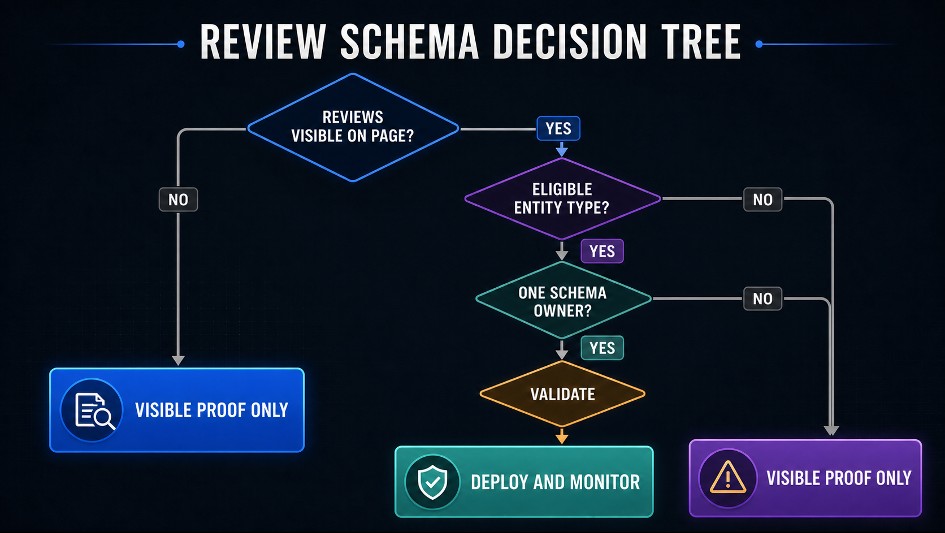
Figure 3. Visible proof and structured-data eligibility are separate decisions; deploy markup only after the page, entity and schema ownership pass validation.
Plan for caching, consent and Content Security Policy
WordPress sites rarely run in a clean, uncached environment. A widget may cross several layers: page cache, minifier, CDN, consent manager, security headers and the visitor’s browser.
Page and object caches
After adding or moving the container, purge the page cache and CDN so the delivered HTML includes the new markup. Remote review data may have its own synchronization schedule; clearing WordPress cache does not force a provider to fetch a newly posted review.
Document the difference for support teams. “The page is cached” and “the review feed has not synchronized yet” are separate failure modes.
JavaScript optimization
Optimization plugins may delay, combine or rewrite scripts. Exclude the widget loader only if testing shows a real conflict, and make the exclusion as narrow as possible. If an error appears only after the load order changes, capture a JavaScript stack trace before adding exclusions; the trace may identify the actual failing call instead of merely hiding it. After changes, test logged-out pages because administrators often bypass the same cache and optimization rules visitors receive.
Content Security Policy
A restrictive Content Security Policy may block the loader, API request, image or iframe. Use the browser console and network panel to identify the exact directive and origin. Add only the required origins to the relevant directives; do not weaken the policy to * simply to make the component appear.
Provider documentation should state which domains are used for scripts, connections, images and frames. Recheck those origins after major updates.
Consent and privacy
Determine what the widget requests and whether it sets cookies or performs tracking. Do not assume every external embed requires prior consent, and do not assume none do. Base the configuration on the actual network behaviour, the provider’s documentation and the site’s legal assessment. If a consent manager delays the script, reserve space or provide a clear placeholder so the page does not appear broken.
Common implementation mistakes
Pasting the loader into every widget block
This produces duplicate requests or initialization races. Place the loader once and reuse containers.
Loading the widget on every page
A site-wide enqueue is easy but wasteful when evidence appears on only a few templates. Add a reliable conditional or let the maintained plugin detect its block or shortcode.
Editing a vendor plugin directly
The next update erases the change. Use supported hooks, CSS overrides in the theme or a companion plugin.
Reserving no space
The feed arrives and pushes the enquiry form downward while the user is about to click. Measure and reserve a responsive minimum height.
Hiding overflow to “fix” the design
This often clips long reviews, focus indicators or expanded text. Find the element imposing the wrong geometry.
Treating async as proof of zero cost
Asynchronous loading prevents parser blocking, but the script can still use network, CPU and main-thread time. Measure the final page.
Promising SEO stars
Valid markup is not a guarantee, and self-serving business reviews have specific restrictions. Describe structured data accurately to stakeholders.
Testing only while logged in
Caching, consent and optimization often differ for public visitors. Test logged out, on mobile, with a throttled connection and with keyboard navigation.
A production QA checklist
Integration
- The chosen block, shortcode, embed or template method has a named owner.
- The widget identifier belongs to the correct business and environment.
- The loader appears once in delivered page source.
- Assets load only on pages where the component is present.
- No vendor plugin files were edited directly.
Performance
- A before-and-after test was recorded under comparable conditions.
- The component does not block the primary content.
- The container reserves enough initial space at each breakpoint.
- The page has no new horizontal overflow or meaningful layout shift.
- Third-party requests and main-thread work are proportionate to the value.
UX and accessibility
- Review text, attribution and dates remain readable on mobile.
- Star ratings have a text alternative.
- Carousel controls have accessible names and visible focus.
- Motion can be paused and reduced-motion preferences are respected.
- The main page task still works if the remote script fails.
SEO and data integrity
- Visible ratings and counts are accurate and attributable.
- Structured data, if used, has one clear owner.
- The entity type and review relationship follow Google’s current guidelines.
- The page passes the relevant validation tools without conflicting entities.
- Nobody has promised that rich-result stars will appear.
Operations
- Cache and CDN purge steps are documented.
- Required CSP origins are recorded narrowly.
- Consent behaviour is based on observed requests and legal guidance.
- Staging and production are checked after plugin, theme or optimization updates.
- Support can distinguish cache delay from review synchronization delay.
Implement the proof as carefully as the promise
Customer reviews can reduce uncertainty at a decisive moment, but only when the implementation respects the rest of the page. Select the smallest integration surface that the team can maintain. Load external code once and only where it adds value. Reserve responsive space, test real content lengths, provide accessible controls and make the main task resilient to remote failure.
Keep structured data honest and separate from the visible design decision. A useful review component does not need a guaranteed search enhancement to justify itself, and no developer can guarantee that enhancement in the first place.
The finished feature should feel native to the WordPress site: editable by the right people, predictable across breakpoints, measurable in performance tools and understandable when something fails. That is the difference between pasting a widget into a page and integrating customer evidence into a production system.
No Comments